User Interface: Difference between revisions
Jump to navigation
Jump to search
No edit summary |
No edit summary |
||
| (13 intermediate revisions by 3 users not shown) | |||
| Line 1: | Line 1: | ||
Vanilla Plus Github Addon Discussion: <nowiki>https://github.com/KrekoG/vanillaplus#addons-maintained-by-the-community</nowiki> | |||
=== General Addons: === | === General Addons: === | ||
* [https://github.com/ | * [https://github.com/hawaiisa/Atlas AtlasLoot (V+ Updated Dungeon/Raid/Profession Tables)] | ||
* [https://github.com/ | * [https://github.com/lokiy999/BetterCharacterStats BetterCharacterStats (w/ V+ stat values/conversions)] ([[Combat Formula Adjustments|See: Mechanical Changes]]) | ||
* [https://github.com/ | * [https://github.com/lokiy999/_LP-VanillaPlus Lazypig V+] | ||
* [https://github.com/GoodOldWoW/MonkeySpeed MonkeySpeed] Displays your current movespeed as xxx% | |||
** [pfQuest is | ** Useful for testing and confirming movespeed effects and how they stack/coincide | ||
* [https://github.com/ | *[https://github.com/hjorim/PallyPower-1.12.1-VanillaPlus Pallypower V+] | ||
* [https://github.com/KrekoG/SpecialTalentUI Special Talent UI Revamp | *[https://github.com/hawaiisa/pfQuest-vanillaplus pfQuest with V+ fixes] | ||
** [pfQuest is recommended over Questie, many Questie features will break on this server] | |||
* [https://github.com/cgoodwin117/pfUI-vanillaplus pfUI with V+ fixes] | |||
* [https://github.com/KrekoG/SpecialTalentUI Special Talent UI Revamp] | |||
** Allows previewing builds and can save presets for role swaps (Can function as ingame talent calculator) | ** Allows previewing builds and can save presets for role swaps (Can function as ingame talent calculator) | ||
==== Vanilla+ Class/Role Specific Tools: ==== | ==== Vanilla+ Class/Role Specific Tools: ==== | ||
| Line 19: | Line 21: | ||
=== Macros: === | === Macros: === | ||
- | * '''Mob Attack Damage/Speed''' | ||
** /script ld, hd, old, ohd, pb, nb, pm = UnitDamage("target"); SendChatMessage(UnitName("target").."'s main hand attacks hit for "..ld.." to "..hd.. " and their offhand attacks hit for "..old.." to "..ohd); | |||
* '''Mob Armor & Resist''' | |||
** /script u=UnitResistance y="target" a=u(y ,0) h=u(y ,1) f=u(y ,2) n=u(y ,3) fr=u(y ,4) s=u(y ,5) z=u(y ,6) SendChatMessage(UnitName(y).." has "..a.." Armor, "..h.." HR, "..f.." FR, "..n.." NR, "..fr.." FrR, "..s.." SR and "..z.." AR.", SAY) | |||
* '''Instance Reset''' | |||
** /script ResetInstances(); | |||
* '''Autoattack''' | |||
** ''[Note: You must set the actionbar slot designated in script to your 'Attack' Spell, see attached image]''[[File:Action Bar Slot Numbers.png|none|thumb]] | |||
*** /script if not IsCurrentAction(12) then UseAction(12) end; | |||
*'''Output Actionbar Slots as Icon Textures''' | |||
**''(Useful for macro/scripting; Searches all bars, to limit change 1,120 to intended range)'' | |||
**<code>/run for l=1,120 do local t=GetActionText(l); local x=GetActionTexture(l); if x then local m="Slot "..l..": ["..x.."]"; if t then m=m.." \""..t.."\""; end; DEFAULT_CHAT_FRAME:AddMessage(m); end; end</code> | |||
* '''Raid Target Icons''' | |||
** '''Focus Fire Target Marks''' | |||
*** '''Skull''' - /script SetRaidTarget("target", 8) | |||
*** '''X/Cross''' - /script SetRaidTarget("target", 7) | |||
**** '''Crowd Control Target Marks''' | |||
***** '''Star''' - /script SetRaidTarget("target", 1) | |||
***** '''Circle''' - /script SetRaidTarget("target", 2) | |||
***** '''Diamond''' - /script SetRaidTarget("target", 3) | |||
***** '''Triangle''' - /script SetRaidTarget("target", 4) | |||
***** '''Moon''' - /script SetRaidTarget("target", 5) | |||
***** '''Square''' - /script SetRaidTarget("target", 6) | |||
Latest revision as of 13:24, 30 April 2026
Vanilla Plus Github Addon Discussion: https://github.com/KrekoG/vanillaplus#addons-maintained-by-the-community
General Addons:
- AtlasLoot (V+ Updated Dungeon/Raid/Profession Tables)
- BetterCharacterStats (w/ V+ stat values/conversions) (See: Mechanical Changes)
- Lazypig V+
- MonkeySpeed Displays your current movespeed as xxx%
- Useful for testing and confirming movespeed effects and how they stack/coincide
- Pallypower V+
- pfQuest with V+ fixes
- [pfQuest is recommended over Questie, many Questie features will break on this server]
- pfUI with V+ fixes
- Special Talent UI Revamp
- Allows previewing builds and can save presets for role swaps (Can function as ingame talent calculator)
Vanilla+ Class/Role Specific Tools:
- Druid Starfall Stun CD Timer (See: Druid Class Changes): https://github.com/hawaiisa/StarfallStunTimer
- Shaman Bloodlust Buff Tracking UI (See: Shaman Class Changes): https://github.com/KrekoG/BloodlustHelper
Macros:
- Mob Attack Damage/Speed
- /script ld, hd, old, ohd, pb, nb, pm = UnitDamage("target"); SendChatMessage(UnitName("target").."'s main hand attacks hit for "..ld.." to "..hd.. " and their offhand attacks hit for "..old.." to "..ohd);
- Mob Armor & Resist
- /script u=UnitResistance y="target" a=u(y ,0) h=u(y ,1) f=u(y ,2) n=u(y ,3) fr=u(y ,4) s=u(y ,5) z=u(y ,6) SendChatMessage(UnitName(y).." has "..a.." Armor, "..h.." HR, "..f.." FR, "..n.." NR, "..fr.." FrR, "..s.." SR and "..z.." AR.", SAY)
- Instance Reset
- /script ResetInstances();
- Autoattack
- [Note: You must set the actionbar slot designated in script to your 'Attack' Spell, see attached image]
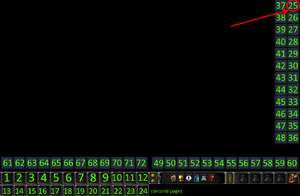
- /script if not IsCurrentAction(12) then UseAction(12) end;
- [Note: You must set the actionbar slot designated in script to your 'Attack' Spell, see attached image]
- Output Actionbar Slots as Icon Textures
- (Useful for macro/scripting; Searches all bars, to limit change 1,120 to intended range)
/run for l=1,120 do local t=GetActionText(l); local x=GetActionTexture(l); if x then local m="Slot "..l..": ["..x.."]"; if t then m=m.." \""..t.."\""; end; DEFAULT_CHAT_FRAME:AddMessage(m); end; end
- Raid Target Icons
- Focus Fire Target Marks
- Skull - /script SetRaidTarget("target", 8)
- X/Cross - /script SetRaidTarget("target", 7)
- Crowd Control Target Marks
- Star - /script SetRaidTarget("target", 1)
- Circle - /script SetRaidTarget("target", 2)
- Diamond - /script SetRaidTarget("target", 3)
- Triangle - /script SetRaidTarget("target", 4)
- Moon - /script SetRaidTarget("target", 5)
- Square - /script SetRaidTarget("target", 6)
- Crowd Control Target Marks
- Focus Fire Target Marks
