Troubleshooting: Difference between revisions
Jump to navigation
Jump to search
No edit summary |
No edit summary |
||
| (12 intermediate revisions by 2 users not shown) | |||
| Line 1: | Line 1: | ||
=== Graphical/UI === | === Graphical/UI === | ||
* '''Windowed Mode = Black Screen''' | |||
* Windowed Mode = Black Screen | ** Add or edit the following lines to your [[Client Configuration|config.txt]] file in V+ Client 'WTF' Folder. | ||
* Missing UI Elements/Tooltip Information | *** SET gxWindow "1" | ||
* | *** SET gxMaximize "1" | ||
* | *** SET gxResolution "1920x1080" | ||
**** '''''[Note: or whatever your current monitor resolution, eg for 4k - 4096x2160 or 3840x2160]''''' | |||
*** SET gxRefresh "60" | |||
**** '''''[Note: 1.12 uses 64 frame animations, so if you set framecap to 64/128/256 and your machine can maintain that fps it may reduce animation stuttering]''''' | |||
* | * '''Missing UI Elements/Tooltip Information''' | ||
* | **Misconfigured WDB/Client Cache Outdated | ||
* | *** Close all open WoW clients. | ||
*** Delete your entire 'WDB' Folder in the V+ Client Folder. | |||
*** Delete patch3.mpq from your 'Data' Folder and replace with updated [https://vanillaplus.org/uploads/patch-3.MPQ <nowiki>patch3.mpq [Vanilla+ Direct Link]</nowiki>]. | |||
*** Open client and confirm fix by WDB folder date created and assets/talents loading. | |||
* '''Known Addon Compatibility Issues'''[[File:Addon Memory.png|thumb|none]] | |||
** Make sure to increase default addon memory limit if using modern addons or UI overhauls [0 is maximum client/system limit] | |||
** '''''[Note: Can be configured through config.txt in V+ client folder or ingame at character login screen in addons tab.]''''' | |||
* '''Community Client Mod Packs''' | |||
** | |||
__FORCETOC__ | |||
Latest revision as of 02:40, 20 April 2026
Graphical/UI
- Windowed Mode = Black Screen
- Add or edit the following lines to your config.txt file in V+ Client 'WTF' Folder.
- SET gxWindow "1"
- SET gxMaximize "1"
- SET gxResolution "1920x1080"
- [Note: or whatever your current monitor resolution, eg for 4k - 4096x2160 or 3840x2160]
- SET gxRefresh "60"
- [Note: 1.12 uses 64 frame animations, so if you set framecap to 64/128/256 and your machine can maintain that fps it may reduce animation stuttering]
- Add or edit the following lines to your config.txt file in V+ Client 'WTF' Folder.
- Missing UI Elements/Tooltip Information
- Misconfigured WDB/Client Cache Outdated
- Close all open WoW clients.
- Delete your entire 'WDB' Folder in the V+ Client Folder.
- Delete patch3.mpq from your 'Data' Folder and replace with updated patch3.mpq [Vanilla+ Direct Link].
- Open client and confirm fix by WDB folder date created and assets/talents loading.
- Misconfigured WDB/Client Cache Outdated
- Known Addon Compatibility Issues
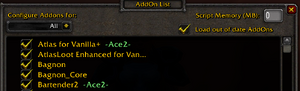
- Make sure to increase default addon memory limit if using modern addons or UI overhauls [0 is maximum client/system limit]
- [Note: Can be configured through config.txt in V+ client folder or ingame at character login screen in addons tab.]
- Community Client Mod Packs
